stateDiagram-v2
[*] --> SUGGESTED : seed by give_advice
SUGGESTED --> ACTIVE : set_active
SUGGESTED --> DISMISSED : dismiss
ACTIVE --> COMPLETED : complete
ACTIVE --> FAILED : fail
ACTIVE --> DEFERRED : defer / set_active(prev)
DEFERRED --> ACTIVE : set_active
DEFERRED --> DISMISSED : dismiss
DISMISSED --> SUGGESTED : re-suggest
Agent Framework
Last updated: 2026-06-01
Agentic framework and structure
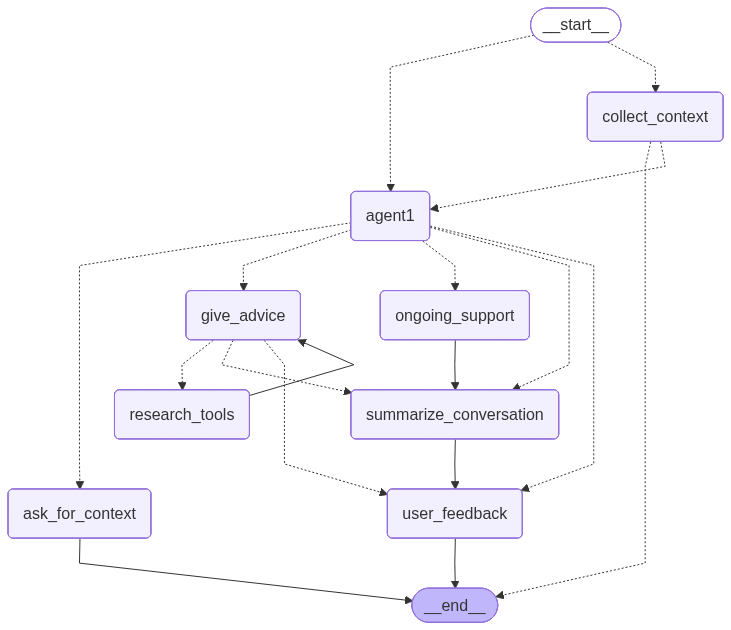
service1 agent. This diagram is automatically generated by the graph definition in api/agents/service1/graph.py.Implementation details
The main agent logic is implemented using langgraph and is located in the api/agents/service1/ directory. The structure is modular, breaking down the agent’s functionality into distinct components:
graph.py: Defines thelanggraphStateGraph, connecting all the nodes and edges that constitute the agent’s logic. It also includes code to automatically generate a Mermaid diagram of the graph’s structure.core/: Contains the core components of the agent.state.py: Defines theService1StateTypedDict, which tracks the agent’s state throughout the conversation, including messages, context, and actions.llm_client.py: Manages the lazy-loaded LLM client (ChatGoogleGenerativeAI) and other services like RAG and Analytics.registry.py: Holds the tool registry, mapping tool names (used in YAML manifests) to their callable implementations.
nodes/: Each file in this directory corresponds to a specific node in the graph, encapsulating a particular piece of logic (e.g., giving advice, collecting context).nodes/manifests/: YAML manifest files, one per node, declaring the prompt structure, tools, and output schema for that node (see NodeEnv below).
memory/: Contains theMemoryLakecomponent for asynchronous, persistent agent memory (see Persistent Memory Lake below).routers/: Contains the conditional routing logic that directs the flow of the conversation between different nodes based on the current state.tools/: LangGraph tool definitions (research_tools.py,contact_tools.py) that nodes can invoke via theresearch_toolstool node.utils/: Provides helper functions, theNodeEnvcompiler (node_env.py), context extraction helpers (context.py), and output formatters (formatters.py).
The agent is designed as a state machine where each node transition is determined by the output of the previous node and the conditional logic in the routers.
Node descriptions
agent1A central router node that uses the LLM to determine the next high-level action (e.g.,
give_advice,collect_context) based on the current conversation history. Its prompt and output schema are declared innodes/manifests/agent1.yaml.collect_contextThis node manages the initial phase of the conversation, guiding the user through a series of questions defined in the i18n configuration (see Dynamic Context Collection). It continues to ask questions until all required context (
context_completeflag) has been collected.ask_for_contextA supplementary node to
collect_context. The conversation is routed here ifagent1determines that the user’s situation requires further clarification outside the standard initial questions.give_adviceThe core node responsible for generating a helpful, empathetic response to the user’s situation. It can trigger the
research_toolstool node to enrich its answer with information from ingested RAG documents.research_toolsA LangGraph
ToolNodethat executes tool calls emitted bygive_advice. Currently integratesresearch_educational_strategiesfor RAG-backed document search. The node generates multiple diverse RAG queries, performs parallelised vector searches, and filters results by an LLM-based relevance score before returning them togive_advice.ongoing_supportAfter the initial advice is given, this node handles the continuing conversation. It provides follow-up support, answers additional questions, and maintains context from the conversation summary stored in the state.
summarize_conversationTriggered at the end of a conversational loop. It generates a concise summary of the interaction. The summary is persisted asynchronously via the
MemoryLake(see below), allowing context to be retained across sessions.user_feedbackA terminal node in the main advice-giving flow. It allows the conversation to end gracefully, awaiting further input from the user. If the user continues the conversation, the flow restarts through the appropriate router.
Routings
Routing is managed by conditional edges that evaluate the agent’s state (Service1State) to determine the next node.
should_collect_contextThe main entry-point router. Routes to
agent1if context is already complete or if the session is in ongoing-support mode; otherwise defaults tocollect_context.give_advice_after_context_collectionFired after
collect_contextcompletes. Routes directly togive_advicewhen all context questions have been answered, bypassingagent1for speed.routerThe primary action router after
agent1. Takes theactionfield set byagent1and routes to the corresponding node (give_advice,ongoing_support,user_feedback, orsummarize_conversation). Also handles the fast-path toongoing_supportwhen the session is already in support mode and the last message is from the human.advice_routerManages the flow after
give_advice. Usestools_conditionto detect pending tool calls and route toresearch_tools; proceeds tosummarize_conversationwhen summarisation is flagged (should_summarize); otherwise returns the action from state.
Advanced Concepts
NodeEnv — Declarative Prompt System
Nodes no longer hard-code their prompts or tool bindings in Python. Instead, each node declares its requirements in a YAML manifest stored in nodes/manifests/:
# Example: nodes/manifests/give_advice.yaml
node: give_advice
prompts:
  base: give_advice_system_prompt
  snippets:
    - first_advice_extension
tools:
  catalog:
    - tool: research_educational_strategies
      condition: first_advice
response_schema: GiveAdviceAnswer
The NodeEnv class (utils/node_env.py) reads the manifest at runtime and:
- Resolves the base system prompt from the i18n layer for the current language and user type.
- Appends any declared supplementary
snippets(e.g.,first_advice_extension). - Filters the
toolscatalog against optional state conditions (e.g., only bind the research tool for the very first advice turn). - Binds the resolved tool list or response schema to the LLM using
bind_tools/with_structured_output.
This design means prompt content can be adjusted in the YAML files or i18n layer without any Python changes. A refresh_manifest_schema.py utility keeps the JSON Schema (node_manifest.schema.json) in sync with the manifest format for IDE validation.
Persistent Memory Lake
Conversation summaries are now persisted asynchronously via the MemoryLake (memory/lake.py), decoupling the agent’s hot path from database I/O:
- After
summarize_conversationgenerates a summary, it drops aQueuedSummaryinto the lake and returns immediately — the agent does not wait for the write. - The lake maintains a two-layer worker pool (3 + 3 async workers). The first layer deduplicates pending writes per
(user_id, session_id)key, keeping only the most recent summary. The second layer flushes these to theMemoryService(which writes to PostgreSQL). - On failure the key is re-queued, providing at-least-once delivery semantics without blocking the conversation.
The MemoryLake is initialised once on application startup and accessed as a singleton via get_memory_lake().
Internationalization (i18n)
The agent is multi-lingual from the ground up. The api/i18n/ directory and i18n_manager.py are central to this capability.
- YAML-Only Content: All user-facing strings — system prompts, UI messages, and context-collection questions — are now stored in YAML files (e.g.,
context_questions/FR.yaml,prompts/teenager/FR/). The older JSON format has been fully retired. - Multi-Tenant Prompt Structure: Prompts are organised by
user_type(teenager/parent) andlanguage, allowing each audience to receive appropriately tailored language and framing. - Dynamic Database Overrides: The system supports dynamic overrides via the
LocalizedContentdatabase table. This allows updating prompts, UI messages, and snippets in production without requiring a code redeployment. Database content always takes precedence over filesystem YAML content. - Two-Layer Caching: The
i18nManageremploys a file-level cache layered on top of a memory-based database override cache, with additional LRU caching on public getter methods to minimise repeated database or file reads. - Synchronization Tool: A
sync_to_db.pyCLI script is provided to synchronize YAML content into the database, facilitating bulk updates and CI/CD integration. - State-Driven Language: The
languagefield inService1Statedrives all translation lookups, making it straightforward to add new languages without changing the agent’s Python code. - XML-Style Tagging: Dynamic content injected into prompts (collected context, previous conversations, privacy guidelines) is wrapped in XML tags (e.g.,
<collected_context>,<previous_conversations>) so the LLM can reliably distinguish information types.
Consent-Aware Session State
The agent inherits the user’s consent status from the AppSession.scope stored in the database. During session initialisation, the ChatService reads this scope and propagates it into Service1State. Nodes can react to consent state when determining response behavior — for example, the collect_context node may adjust its approach for users in ONBOARDING scope who have not yet completed the consent flow. See Backend API — Consent-Based Session Scoping for the full consent pipeline.
Dynamic Context Collection
The collect_context node uses a sophisticated mechanism to extract structured information from a user’s initial message.
- Structured Output: It uses the LLM’s structured output capability (
with_structured_output). - Dynamic Pydantic Models: The
utils/context.pyfile contains aQAFactoryfunction that dynamically creates a PydanticBaseModelfrom the list of context questions for the user’s language. For multiple-choice questions,Literaltypes constrain the output to valid values. - Confident Extraction: Each answer is accompanied by the model’s
reasoningandconfidencelevel, so only explicitly stated information is used — reducing hallucinations. - AI-Driven Dynamic Questions (feature-flagged): When the
enable_dynamic_question_generationfeature flag is enabled, the node can ask the LLM to generate additional follow-up questions beyond the static set, collecting richer situational context. This is controlled at runtime without code changes.
Sequential Dynamic Question Generation
When the enable_sequential_dynamic_question_generation feature flag is active (in addition to enable_dynamic_question_generation), the context collection node switches to a sequential adaptation mode:
- One question at a time: Rather than extracting all context from the initial message, the node asks questions one-by-one, adapting each subsequent question based on the user’s previous answers.
- Comprehensive question adaptation: The LLM evaluates which contextual information has already been gathered and generates only the next most relevant question. This prevents redundant questioning and creates a more natural conversational flow.
- Context completion detection: The node tracks which context fields have been filled and stops when all required context is collected (
context_complete == true).
This mode is designed for situations requiring deeper, more adaptive context gathering — particularly useful for the teenager variant where building rapport through a natural question flow improves disclosure.
Strategy Selection
The give_advice node includes a strategy selection step that chooses appropriate response strategies from a predefined orientation matrix. This is not a hardcoded decision tree — the LLM selects and ranks strategies based on the user’s specific situation.
Strategy Categories
Strategies are organized into four scopes, ordered by typical priority:
| Scope | Priority Range | Purpose |
|---|---|---|
immediate |
1–2 | Crisis response: pause, breathe, report, block |
support |
2–7 | Social support: friends, parents, teachers |
preventive |
3–8 | Long-term: digital citizenship, online boundaries |
escalation |
4–9 | Professional help: helplines, human support team |
Strategy Catalog (10 strategies)
| # | Strategy Key | Scope | Description |
|---|---|---|---|
| 1 | short_term_advice |
immediate | Pause, breathe, take screenshots — universal first step |
| 2 | report_blocking_platforms |
immediate | Report and block on the platform (unknown perpetrators) |
| 3 | in_person |
support | Talk directly with the other person (known persons only) |
| 4 | support_friends |
support | Talk to trusted friends |
| 5 | support_parents |
support | Involve parents or guardians |
| 6 | support_teachers |
support | Seek help from teachers/school counselors |
| 7 | direct_response_online |
preventive | Craft replies, set boundaries, manage online presence |
| 8 | protect_and_respect |
preventive | Long-term digital citizenship and privacy hygiene |
| 9 | support_help_lines |
escalation | Professional helplines and support services |
| 10 | support_human_level2_mm |
escalation | MonsterMessenger human support team (last resort) |
How It Works
Strategy Manifest: All 10 strategies are defined in
utils/strategy_manifest.yamlwith descriptions, applicable conditions, and typical priority ranges. The manifest is loaded at import time intoALL_STRATEGIES.LLM Selection: The
give_adviceprompt includes the full strategy catalog as XML markup. The LLM outputs aStrategySelectioncontaining:strategy_list: 3–7 selected strategies, each with arankand aui_option(emoji + label for frontend display)reasoning: Brief justification for the selection
UI Options: Each selected strategy includes a
StrategyOptionwith an emoji, a concise action label (e.g., “Set online boundaries”), and a value identifier for frontend rendering. These appear as interactive choice buttons in the UI.Frontend Integration: The selected strategies are rendered via the unified
InteractivePromptsystem withprompt_style = "choice". Users can tap a strategy to explore it, and the selection feeds back into the conversation.
Strategy Definition Format
Each strategy in the manifest has:
- id: support_parents
  typical_priority_range: [2, 6]
  category: support
  description: >
    Involving parents or guardians in the resolution...
  applicable_conditions: >
    Applicable in both online and offline situations...
The applicable_conditions field is natural language that the LLM uses to determine whether a strategy fits the user’s situation. The typical_priority_range guides the LLM’s ranking.
Strategy Memory
The agent now maintains a conversation-scoped strategy memory that tracks which strategies have been suggested, activated, deferred, or dismissed over the course of a session. This enables the agent to avoid repeating dismissed strategies and to adapt its recommendations based on the user’s past choices.
Data Model
The memory is modelled in agents/service1/utils/strategy_memory.py using Pydantic models:
| Model | Fields | Purpose |
|---|---|---|
StrategyKey |
strategy_id, scope, ranking_range |
Identifies a specific strategy |
StrategyInstance |
strategy_key, status, chat_session_id, suggested_at, chosen_at, completed_at, annotation, annotation_phase |
Tracks one strategy’s lifecycle within a session |
StrategyMemory |
history: List[StrategyInstance], MAX_HISTORY = 20 |
The full in-memory history for one conversation |
Annotation |
author, timestamp, text |
A free-text note attached to a strategy instance |
Enums:
| Enum | Values | Purpose |
|---|---|---|
StrategyStatus |
SUGGESTED, ACTIVE, DEFERRED, COMPLETED, FAILED, DISMISSED |
Lifecycle state |
AnnotationPhase |
ONGOING, AFTER_COMPLETION, AT_DISMISSAL |
When an annotation was added |
State Machine
Each StrategyInstance transitions through states in a directed graph:
Key behaviours:
set_activeauto-defers any previously ACTIVE strategy toDEFERRED(notCOMPLETED)set_activeaccepts an optionalprevparameter to control whether the displaced strategy becomesDEFERREDorFAILED- Only one strategy can be
ACTIVEat a time MAX_HISTORY = 20with oldest-first eviction bysuggested_at
Integration with Agent State
The Service1State TypedDict in core/state.py carries the memory as:
strategy_memory: Annotated[Optional[StrategyMemory], merge_strategy_memory]The custom merge_strategy_memory reducer handles parallel tool-call collisions (when the LLM issues multiple strategy_management calls in one turn):
- Deduplication: Merges instances by
(strategy_key, chat_session_id) - Conflict resolution: When two parallel calls modify the same instance, the higher-priority status wins (
ACTIVE > DEFERRED > DISMISSED > SUGGESTED) - Annotation merging: Annotations from both branches are preserved
The conversation_id field in state is used as the storage key.
Tools
Two dedicated tools are registered in tools/strategy_tools.py:
strategy_management — The LLM calls this to modify strategy state:
| Action | Parameters | Effect |
|---|---|---|
set_active |
strategy_key, prev (DEFERRED or FAILED) |
Activates a strategy; auto-defers the previous active one |
defer |
strategy_key, reason |
Pauses a strategy for later |
dismiss |
strategy_key, reason |
Marks a strategy as rejected |
complete |
strategy_key, annotation (optional) |
Marks as successfully completed |
fail |
strategy_key, reason, annotation (optional) |
Marks as attempted but unsuccessful |
annotate |
strategy_key, annotation, annotation_phase |
Adds a note without changing status |
strategy_lookup — Retrieves the full history for one or more StrategyKey values. Returns JSON with status, timestamps, and annotations.
Both tools are available only in the ongoing_support node (not in give_advice). A separate memory_tools ToolNode processes these calls, with a dedicated ongoing_support_router that routes to it and loops back to ongoing_support after execution.
Each tool call is decorated with @sse_emitter_decorator (see SSE Tool-Call Events below), which emits a real-time tool_call SSE event when the emit_tool_calls_via_sse feature flag is enabled.
Seeding (give_advice)
During the first advice turn, give_advice seeds the memory with SUGGESTED strategies:
- The LLM selects 3–7 strategies via
strategy_choice_instructions(teenager users only) - For each selected strategy, the node calls
memory.get_instance(strategy_key, chat_session_id)to avoid duplicates - If no existing instance is found,
memory.add_instance()adds aSUGGESTEDentry - The updated memory is directly persisted via
MemoryService.write_strategy_memory()— a synchronous write, unlike the two-layer worker pattern used for conversation summaries
The seeding logic is in nodes/advice.py.
Persistence
Strategy memory is stored in the LangGraph PostgresStore under namespace ("strategy_memory", user_id) with key conversation_id. The MemoryService provides:
write_strategy_memory(c_id, u_id, memory)— full replacement writeget_strategy_memory(c_id, u_id)— deserializes stored JSON back intoStrategyMemory
On cold start (new user, new conversation), strategy_memory is None in state. The compile_initial_state method in AppDataService loads existing memory from the store during session resumption.
On resume, the loaded memory appears in the agent’s prompt via the formatter, giving the agent full context of previously tried strategies.
Prompt Injection
The format_strategy_memory function in utils/formatters.py converts the StrategyMemory history into an XML-tagged block:
<strategy_memory>
  <instance>
    <key>support_parents</key>
    <status>ACTIVE</status>
    <suggested_at>2026-05-29T10:32:00Z</suggested_at>
    <chosen_at>2026-05-29T10:32:00Z</chosen_at>
  </instance>
  <instance>
    <key>report_blocking_platforms</key>
    <status>DISMISSED</status>
    <suggested_at>2026-05-28T14:22:00Z</suggested_at>
    <annotation>User said they already tried this</annotation>
  </instance>
</strategy_memory>
The block is injected into ongoing_support.yaml and give_advice.yaml manifests via the strategy_memory_context snippet, controlled by a condition that checks for non-empty history. When the memory is None or empty, the formatter returns an empty string — the LLM sees no strategy history.
A companion format_user_profile formatter is also available, injecting a condensed user_profile block with user type and language.
SSE Tool-Call Events
Every tool call made by the agent is broadcast to the frontend as a real-time Server-Sent Event:
- The
sse_emitter_decoratorintools/__init__.pywraps each tool function - Before executing the tool, it checks
emit_tool_calls_via_sse(feature flag, backend-only) andclient_config.supports_ssefrom the client - If both are true, it emits a
tool_callSSE event via the centralizedget_sse_manager()singleton incore/dependencies.py - The event payload contains
tool_name(e.g.strategy_management),tool_call_id, andparams(excluding theruntimeobject)
The SSEManager singleton lives in services/sse_manager.py and is accessed exclusively through core.dependencies.get_sse_manager() — no other file imports sse_manager directly. This ensures the same instance serves both the SSE decorator and the /events/listen endpoint.
Frontend Integration:
- The
useSSEhook (frontend/src/hooks/useSSE.tsx) listens fortool_callevents and updateslastToolCallEventin context clearLastToolCallEvent()consumes the event after display to prevent re-triggering on re-renders- The
ToolCallIndicatorcomponent (frontend/src/components/ToolCallIndicator.tsx) renders a small icon overlay on the monster avatar:BookOpenforresearch_*toolsMapPinforstrategy_*toolsWrenchfor all others
- The indicator is feature-flagged behind
react_sse_tool_calls(frontend flag) - A CSS animation (
@keyframes toolCallFade) provides a scale-pop-in + fade-out over 2 seconds - Key-driven re-mounting forces the animation to retrigger on each new event
- Mounted as a singleton inside
Message.tsx, gated byisLast(only the latest bot message shows the indicator)
Feature Flags
Two flags control the SSE tool-call pipeline, both seeded in _seed_default_flags():
| Flag | Visibility | Default | Controls |
|---|---|---|---|
emit_tool_calls_via_sse |
BACKEND |
true |
Whether the decorator emits events at all |
react_sse_tool_calls |
FRONTEND |
true |
Whether the frontend renders the indicator |
Disabling the backend flag cuts the entire pipeline at the source. Disabling only the frontend flag hides the visual indicator while events continue to flow.
Observability with Langfuse
The agent is integrated with Langfuse for tracing and monitoring, configured in api/agents/service1/utils/observability.py.
- Callback Handler: A custom
AsyncCallbackHandler,ErrorFlagger, is attached to the LLM client. - Error Flagging: The
on_llm_endmethod inspects the LLM response metadata. If it finds ablock_reason(response blocked by safety filters), it updates the corresponding trace in Langfuse. - Debugging: This provides immediate visibility into when and why the LLM refuses to respond, which is important given the sensitive domain.
Monster Interaction System
The chatbot uses monster characters as a gamification and rapport-building layer. During conversations, the agent can switch between different monsters — each with a distinct personality, emoji, and visual avatar.
Monster Catalog
The MonsterStateChangeHandler maintains a map of 11 monsters:
| Key | Display Name | Key | Display Name |
|---|---|---|---|
moustache |
Moustache | nosy |
Nosy |
cyclops |
Cyclops | brocoli |
Mme. Brocoli |
rocky |
Rocky | dinny |
Dinny |
mandarina |
Mandarina | harry |
Harry |
bart |
Bart | charlie |
Charlie |
freddysecurity |
Freddy Security |
The default monster is betty.
State Change Detection
The MonsterStateChangeHandler (api/services/monster_callbackhandler.py) is a LangChain AsyncCallbackHandler attached to the agent graph. It tracks monster state per conversation thread:
on_chain_start
    │
    ├── Captures thread_id from metadata
    ├── Caches initial monster from inputs["monster"]
    └── Stores run_id → thread_id mapping

    ... agent runs, potentially changing monster ...

on_chain_end
    │
    ├── Retrieves thread_id from run_id mapping
    ├── Compares state["monster"] against cached value
    ├── If changed:
    │   ├── Persists new monster to DB (chat_sessions.current_monster)
    │   ├── Emits SSE "settings" event with monster change announcement
    │   │   (i18n key: "monster_change_announcement")
    │   ├── Emits SSE "settings" event with new monster name
    │   └── Updates thread cache
    └── Cleans up run_id mapping

on_chain_error
    └── Cleans up run_id mapping (preserves monster state)
How Monster Changes Occur
The monster field in the LangGraph state is set by agent nodes. The agent decides which monster is appropriate based on the conversation context — for example, switching to a more empathetic monster when the user expresses distress, or to a more playful one during lighter moments.
SSE Emission
For clients that support SSE (supports_sse == true), the callback emits two events on monster change:
- Announcement:
event: "settings"with{"monster": "<previous>", "message": "<i18n announcement>"}— a localized message like “Rocky will help you” that the frontend can display - Switch:
event: "settings"with{"monster": "<new>"}— triggers the frontend to update the monster avatar
A small delay (await asyncio.sleep(0.1)) between emits ensures Cloud Run/GCLB flushes the buffer.
Frontend Integration
The frontend listens for settings SSE events and: - Updates the MonsterAvatar component (with optional 3D flip animation controlled by enable_monster_flip_animation) - Displays the announcement message in the chat - Persists the current monster in app state
Persistence
Monster changes are persisted to the chat_sessions.current_monster field in the database, ensuring the monster state survives server restarts and session resumption.
Service and LLM Client Configuration
The api/agents/service1/core/llm_client.py file centralises LLM and service initialisation.
- Lazy Loading:
get_llm(),get_rag_service(), andget_analytics_service()are lazy-loaded — initialised on first call rather than at startup. - LLM Safety Settings: The
ChatGoogleGenerativeAIclient deliberately disables all default safety filters (HarmBlockThreshold.BLOCK_NONE) to handle sensitive topics. Content safety is managed through prompt design and theErrorFlaggerobservability layer. - User-Type-Aware RAG Service:
get_rag_serviceinitialises aRAGServiceaware of theuser_type(teenager/parent), routing it to the correct vector-database collection.